.png?width=700&height=200&name=Untitled%20design%20(43).png)
Library Overview
After the start of the school year, you'll see a Library menu option appear in the lefthand sidebar of the OpenEd platform.
Your student's library is where you can access all of the educational resources that you've purchased through the marketplace.
If you sign up for any events or clubs, they'll show up on this page, too.
What To Expect From Your Student's Library
On the Library page, you'll see a separate tile for each of your student's resources.
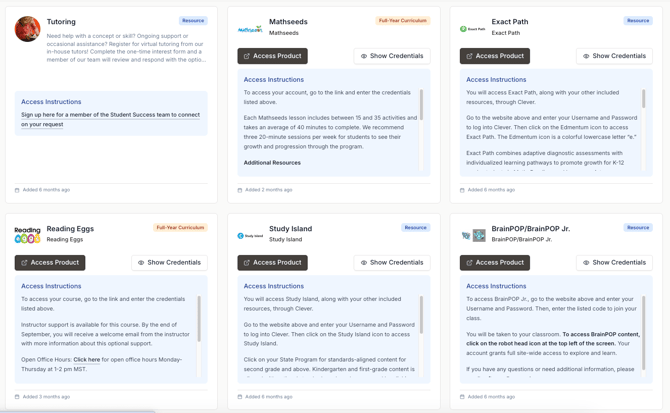
These tiles include access instructions to give you some guidance about how to use each resource.

Frequently Asked Questions
Where can I find the Library menu in OpenEd?
After the start of the school year, you'll see a Library menu option appear in the lefthand sidebar of the OpenEd platform.
What is the student library used for?
Your student's library is where you can access all of the educational resources that you've purchased through the marketplace. It also displays any events or clubs you sign up for.
How are resources displayed in the Library?
On the Library page, you'll see a separate tile for each of your student's resources. These tiles include access instructions to give you guidance about how to use each resource.
Will events and clubs appear in the Library?
Yes, if you sign up for any events or clubs, they'll show up on the Library page too, along with your purchased educational resources.