📽️ See how easy it is:
.png?width=170&height=40&name=OpenEd_logo_noborder%20(1).png "OpenEd_logo_noborder (1)")
Creating an Education Plan is the first step in customizing your student’s learning.
It's quick, flexible, and designed to make your child's school year fit their unique needs. Think of it as your student’s roadmap for the year. This plan simply outlines the subjects your student will learn this year. Depending on your student’s grade level, some core subjects — like math, English, science, and social studies — will automatically be included on their education plan.
While you will report participation each week for your student's required subjects, you have unlimited options for what your student studies! Independent Studies are a great way to add subjects your student may not touch each week or subjects that fall outside of the traditional required learning. The best part? You can add Independent Study subjects throughout the year! There's no limit to the number of Independent Study subjects your student can include on their education plan. Feel free to explore and learn!
As a reminder, you can be reimbursed for Independent Study subject resources and materials.
Want more information? Check out Parent Link!
Here are a few things to note as you complete the birth certificate task:
- We need you to upload an official birth certificate. If you don't have an official copy of your student's birth certificate, you can submit another proof of identity (Passport, birth certificate copy, birth certificate card, Blessings and/or Church records, or Hospital records) and a notarized Affidavit of Birth form. This form is valid for 30 days, giving you time to obtain an official birth certificate for your student.
- Students can be enrolled by either parent listed on the birth certificate. If your family situation is different or if the enrolling parent or the student has a new name not represented on the birth certificate, we'll need some additional information. You'll want to also upload supporting documentation like:
- A marriage certificate to explain a name change
- Adoption or legal guardianship papers to explain a different adult enrolling the student
- Legal name change documentation to explain a student's new name
What are we looking for in a proof of residency document?
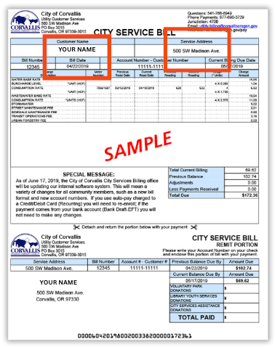
- We're looking for the date the document was issued. That means the statement date, mailing date, or meter read date. We aren't able to use the due date, so please be sure to submit the full statement page rather than just the payment coupon portion.
- At least one of the parents on the birth certificate should be named as the account holder. If dad is the named parent enrolling the student in our system, it's okay if mom's name is the one on the bill!
- If you don't have a document in your name(s) because you live with another family, no problem! You'll need to submit a signed and notarized Living With Another Family form along with a proof of residency document in the homeowner's name(s).
- If you don't have a document in your name(s) because you live with another family, no problem! You'll need to submit a signed and notarized Living With Another Family form along with a proof of residency document in the homeowner's name(s).
- We're checking to make sure the document is one we can accept. See below for a complete list of acceptable documents - not sure if yours works? Reach out! I'm happy to help!
There are two types of acceptable documents to prove residency.
Documents issued within the last 60 days:
-
Utility bill (gas, electric, sewer, home internet, garbage, water, propane)
-
Mortgage statement
-
Rental statement
Current and Active Documents:
- Driver's License (matching address on student profile)
- Car insurance
NON-Example:

Accepted Example (FULL PAGE with Name, Address, Billing date within 60 days):

Here are a few things to note as you complete the immunization records task:
- Students need to be fully immunized for their grade level or submit an exemption. Even if your student is still within the recommended age window or your pediatrician is waiting to give the next dose, the state requires a student be complete for grade level or submit an exemption. If your student is missing any shots, please go ahead and submit a Personal Exemption.
- Oregon's Personal Exemption has TWO required forms. We need both forms completed and submitted to enroll. For new students, these forms must be dated within this calendar year.
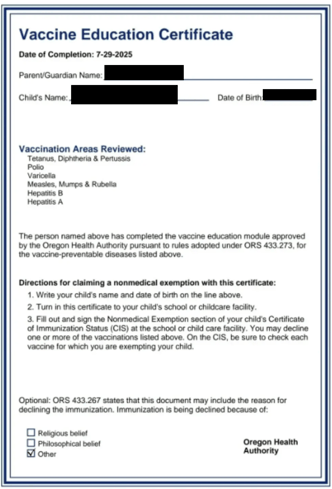
- First, you'll need to complete the Online Module - that will generate a Vaccine Education Certificate (see the example below). You must complete that certificate with the student's name and birthdate for it to be valid. Our example is blacked out in that section for student privacy, but yours should be visible.
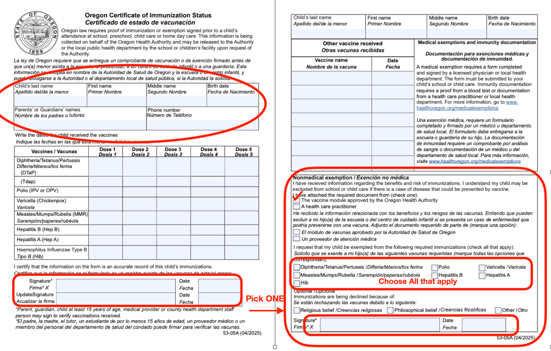
- You'll also need to complete the non-medical exemption section of the Certificate of Immunization Status form. Please ensure you fill out all the fields, especially in the non-medical exemption section on page 2. All applicable checkboxes need to be checked and the form needs to be signed by the parent to be valid. See our example below for the sections that must be completed.
- First, you'll need to complete the Online Module - that will generate a Vaccine Education Certificate (see the example below). You must complete that certificate with the student's name and birthdate for it to be valid. Our example is blacked out in that section for student privacy, but yours should be visible.
- Your student's immunization record needs to show their full name and date of birth as well as the dates of all required vaccine doses. It's best to request a current, updated official copy of the record from your pediatrician, as screenshots from a health portal, school record screen shots (such as from Infinite Campus, etc), and paper vaccine cards often do not have all the information we need.
- There are certain spacing and age requirements for each of the required vaccines. Our system may flag a dose if it is given too early for validity. In that case, we'll send an email letting you know. You're always welcome to consult with your student's health care provider and make your own choice whether to get a new dose or submit an exemption.
You'll be asked a series of questions about your student, your family, and your living situation.
- These questions help us identify any needs we can help meet or special circumstances that may make your student eligible for additional services.
- Depending on your student's unique learning needs, you may be asked for more information about grade placement or educational history. If any additional information is needed, our system will prompt you to submit documentation or answer further questions. Need help? Reach out to me! That's what I'm here for!